微服务容错处理的引入
微服务架构高并发导致系统负载过高存在的问题分析
在微服务架构中,会将业务拆分成一个个的服务,服务与服务之间可以相互调用,由于网络原因或者自身的原因,服务并不能保证服务的100%可用,如果单个服务出现问题,调用这个服务就会出现网络延迟,此时若有大量的网络涌入,会形成任务累计,导致服务瘫痪。
在 Spring Boot 程序中,默认使用内置 tomcat 作为 web 服务器。单 tomcat 支持最大的并发请求是有限的,如果某一接口阻塞,待执行的任务积压越来越多,那么势必会影响其他接口的调用
搭建模拟高并发并请求响应过慢的示例
复用前面
microservice-no-springcloud项目代码,模拟高并发请求的案例
模拟服务接口响应慢
- 修改
shop-service-product服务的ProductController控制类的findById方法,令线程睡眠2秒,模拟响应慢
@GetMapping("/{id}")
public Product findById(@PathVariable Long id) {
    // 睡眠2秒,模拟请求响应慢
    try {
        Thread.sleep(2000L);
    } catch (InterruptedException e) {
        e.printStackTrace();
    }
    return productService.findById(id);
}- 修改
shop-service-order服务的application.yml配置,调小tomcat容器最大连接数,模拟并发请求数量超出web容器可承受最大连接数
server:
  port: 9002 # 项目端口
  tomcat:
max-threads: 10 # 修改web容器最大连接数- 修改
shop-service-order服务的OrderController控制类,增加一个普通的请求方法,用于测试其他请求接口阻塞时,此请求的响应时间
@GetMapping(value = "/{id}")
public String findOrder(@PathVariable Long id) {
    System.out.println(Thread.currentThread().getName());
    return "根据id查询订单";
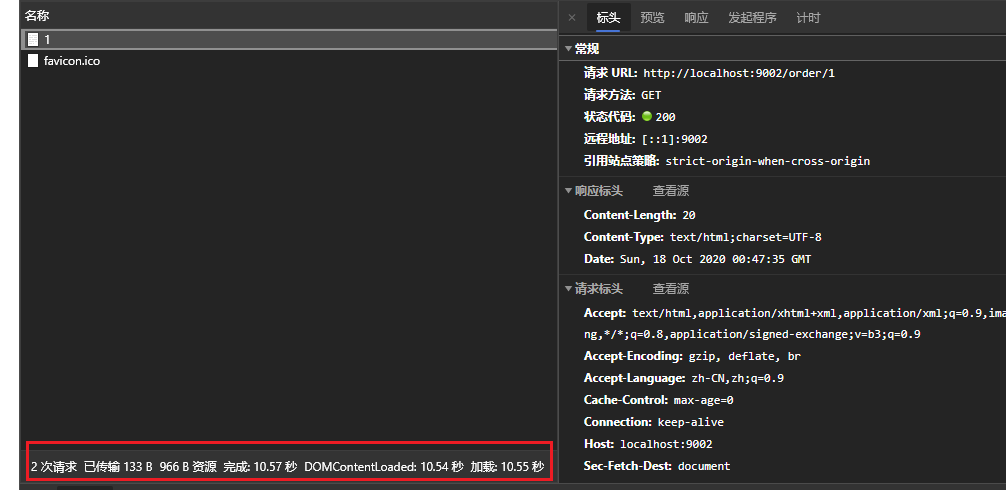
}- 启动product与order服务,使用jMeter压力测试工具,创建一个每秒50并发的POST请求一直请求创建订单的接口,然后在浏览器中访问
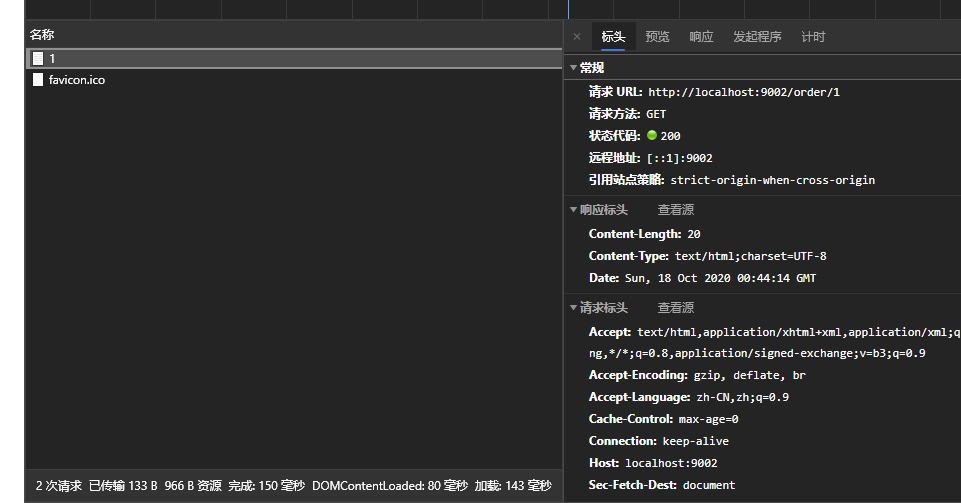
http://localhost:9002/order/1查询订单接口,观察此接口响应时间
单独请求的响应时间
开启并发请求创建订单接口后,再次访问此查询接口的响应时间
基于线程池的形式实现服务隔离
改造
spring-cloud-sample-concurrency-isolation工程,实现线程池的隔离
引入依赖
为了方便实现线以线程池的形式完成资源隔离,需要在shop-service-order工程中引入如下依赖
<!-- hystrix 组件的依赖,此示例用于实现基于线程池的形式完成服务的隔离 -->
<dependency>
    <groupId>com.netflix.hystrix</groupId>
    <artifactId>hystrix-metrics-event-stream</artifactId>
    <version>1.5.12</version>
</dependency>
<dependency>
    <groupId>com.netflix.hystrix</groupId>
    <artifactId>hystrix-javanica</artifactId>
    <version>1.5.12</version>
</dependency>
分配线程池
配置HystrixCommand接口的实现类,在实现类中可以对线程池资源进行分配
package com.moon.order.command;

import com.moon.entity.Product;
import com.netflix.hystrix.HystrixCommand;
import com.netflix.hystrix.HystrixCommandGroupKey;
import com.netflix.hystrix.HystrixCommandKey;
import com.netflix.hystrix.HystrixCommandProperties;
import com.netflix.hystrix.HystrixThreadPoolKey;
import com.netflix.hystrix.HystrixThreadPoolProperties;
import org.springframework.web.client.RestTemplate;

/**
 * HystrixCommand的原生实现方式,对服务进行服务降级限流
 */
public class OrderCommand extends HystrixCommand<Product> {

    private RestTemplate restTemplate;

    private Long id;

    public OrderCommand(RestTemplate restTemplate, Long id) {
        super(setter());
        this.restTemplate = restTemplate;
        this.id = id;
    }

    private static Setter setter() {

        // 服务分组
        HystrixCommandGroupKey groupKey = HystrixCommandGroupKey.Factory.asKey("order_product");
        // 服务标识
        HystrixCommandKey commandKey = HystrixCommandKey.Factory.asKey("product");
        // 线程池名称
        HystrixThreadPoolKey threadPoolKey = HystrixThreadPoolKey.Factory.asKey("order_product_pool");
        /*
         * 线程池配置
         *     withCoreSize : 线程池大小为10
         *     withKeepAliveTimeMinutes : 线程存活时间15秒
         *     withQueueSizeRejectionThreshold : 队列等待的阈值为100,超过100执行拒绝策略
         */
        // 注:测试案例设置了tomcat最大线程数为10,所以这里设置线程池大小为5,实现此接口的线程数量控制。
        HystrixThreadPoolProperties.Setter threadPoolProperties = HystrixThreadPoolProperties.Setter().withCoreSize(5)
                .withKeepAliveTimeMinutes(15).withQueueSizeRejectionThreshold(100);

        // 命令属性配置Hystrix 开启超时
        HystrixCommandProperties.Setter commandProperties = HystrixCommandProperties.Setter()
                // 采用线程池方式实现服务隔离
                .withExecutionIsolationStrategy(HystrixCommandProperties.ExecutionIsolationStrategy.THREAD)
                // 禁止
                .withExecutionTimeoutEnabled(false);
        return HystrixCommand.Setter.withGroupKey(groupKey).andCommandKey(commandKey).andThreadPoolKey(threadPoolKey)
                .andThreadPoolPropertiesDefaults(threadPoolProperties).andCommandPropertiesDefaults(commandProperties);

    }

    @Override
    protected Product run() throws Exception {
        return restTemplate.getForObject("http://127.0.0.1:9001/product/" + id, Product.class);
    }

    /**
     * 服务降级方法
     *
     * @return
     */
    @Override
    protected Product getFallback() {
        Product product = new Product();
        product.setProductName("服务降级方法返回的数据");
        return product;
    }
}
服务调用的改造
修改OrderController,使用自定义的OrderCommand完成调用
@PostMapping("/{id}")
public String createOrder(@PathVariable Long id) {
    // 使用OrderCommand调用远程服务
    OrderCommand orderCommand = new OrderCommand(restTemplate, id);
    Product product = orderCommand.execute();
    LOGGER.info("当前下单的商品是: ${}", product);
    return "创建订单成功";
}
测试
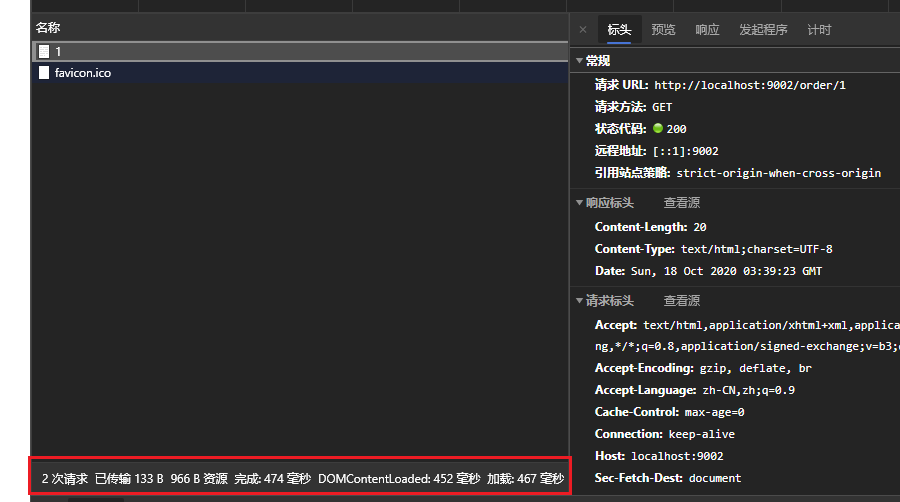
按上面案例测试方式,启动product与order服务,使用jMeter压力测试工具,创建一个每秒50并发的POST请求一直请求创建订单的接口,然后在浏览器中访问http://localhost:9002/order/1查询订单接口,观察此接口响应时间。因为控制了请求product服务的线程数量,所以此请求响应不会被影响
Hystrix 介绍
Hystrix 是由 Netflix 开源的一个延迟和容错库,用于隔离访问远程系统、服务或者第三方库,防止级联失败,从而提升系统的可用性与容错性。Hystrix 主要通过以下几点实现延迟和容错。
- 包裹请求:使用 HystrixCommand 包裹对依赖的调用逻辑,每个命令在独立线程中执行。这使用了设计模式中的“命令模式”。
- 跳闸机制:当某服务的错误率超过一定的阈值时,Hystrix 可以自动或手动跳闸,停止请求该服务一段时间。
- 资源隔离:Hystrix 为每个依赖都维护了一个小型的线程池(或者信号量)。如果该线程池已满,发往该依赖的请求就被立即拒绝,而不是排队等待,从而加速失败判定。
- 监控:Hystrix 可以近乎实时地监控运行指标和配置的变化,例如成功、失败、超时、以及被拒绝的请求等。
- 回退机制:当请求失败、超时、被拒绝,或当断路器打开时,执行回退逻辑。回退逻辑由开发人员自行提供,例如返回一个缺省值。
- 自我修复:断路器打开一段时间后,会自动进入“半开”状态。
Hystrix 对 RestTemplate 实现服务的熔断
示例项目搭建
复用spring-cloud-sample-ribbon工程的代码,创建新的工程spring-cloud-sample-hystrix-resttemplate。整理删除一些无用的依赖与代码
配置 hystrix 依赖
在 shop-service-order 模块中添加 Hystrix 的相关依赖
<!--引入hystrix依赖-->
<dependency>
    <groupId>org.springframework.cloud</groupId>
    <artifactId>spring-cloud-starter-netflix-hystrix</artifactId>
</dependency>
开启熔断支持
在shop-service-order工程中,在OrderApplication启动类中添加@EnableCircuitBreaker注解,代表开启对熔断的支持
@SpringBootApplication(scanBasePackages = "com.moon.order")
@EntityScan("com.moon.entity") // 指定扫描实体类的包路径
@EnableCircuitBreaker // 开启hystrix熔断支持
public class OrderApplication {
    public static void main(String[] args) {
        SpringApplication.run(OrderApplication.class, args);
    }
}注:随着功能的增多,微服务的启动类中的注解也越来越多。所以SpringCloud提供了一个组合注解注解:@SpringCloudApplication。此注解相关于@SpringBootApplication + @EnableDiscoveryClient + @EnableCircuitBreaker,注解源码如下:
@Target(ElementType.TYPE)
@Retention(RetentionPolicy.RUNTIME)
@Documented
@Inherited
@SpringBootApplication
@EnableDiscoveryClient
@EnableCircuitBreaker
public @interface SpringCloudApplication {
}
对工程的启动类进行以下的改造,其效果以上面配置一致
@EntityScan("com.moon.entity") // 指定扫描实体类的包路径
@SpringCloudApplication // 此组合注解相当于 @SpringBootApplication + @EnableDiscoveryClient + @EnableCircuitBreaker
public class OrderApplication {
}
配置熔断降级业务逻辑
改造shop-service-order工程的OrderController控制类,增加熔断部分的逻辑
开启熔断与配置单个降级方法
- 编写一个服务降级(回退)方法
orderFallBack方法。有以下注意点- 此降级方法要与相应的熔断方法具有相同的参数列表
- 此降级方法要与相应的熔断方法具有相同的返回值类型
- 需要熔断的方法上,标识注解
@HystrixCommand,代表此方法需要熔断,然后在注解的fallbackMethod属性,指定熔断触发的降级方法名称
@RestController
@RequestMapping("order")
public class OrderController {
    /* 日志对象 */
    private static final Logger LOGGER = LoggerFactory.getLogger(OrderController.class);

    // 注入HTTP请求工具类RestTemplate
    @Autowired
    private RestTemplate restTemplate;

    /*
     * 标识 @HystrixCommand 注解代表此方法配置熔断保护
     *      fallbackMethod属性:指定熔断之后的降级方法
     */
    @HystrixCommand(fallbackMethod = "orderFallBack")
    @PostMapping("/{id}")
    public String createOrder(@PathVariable Long id) {
        // 调用服务
        Product product = restTemplate.getForObject("http://shop-service-product/product/" + id, Product.class);
        LOGGER.info("当前下单的商品是: ${}", product);
        return "创建订单成功";
    }

    /*
     * 降级方法
     *  和需要收到保护的方法的返回值一致
     *  方法参数一致
     */
    public String orderFallBack(Long id) {
        LOGGER.info("当前下单商品的id是: " + id + ",触发createOrder熔断的降级方法");
        return "当前下单商品的id是: " + id + ",触发createOrder熔断的降级方法";
    }
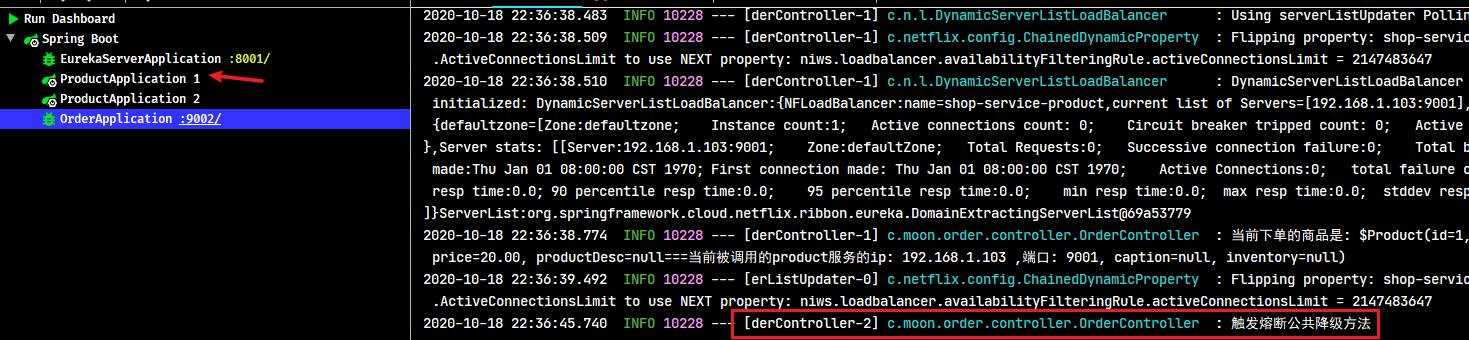
}- 测试,当
shop-service-product微服务正常时,浏览器访问http://127.0.0.1:9002/order/1可以正常调用服务提供者获取数据。当将商品微服务停止时继续访问,

开启熔断与配置统一降级方法
如果当前类中每个方法的降级方法逻辑都一样,可以在当前类上标识@DefaultProperties注解,并在defaultFallback属性中指定公共的降级方法名称。
注:如果过在@DefaultProperties指定了公共的降级方法,则相应配置@HystrixCommand熔断保护的方法不需要单独指定了降级方法
@RestController
@RequestMapping("order")
/*
 * @DefaultProperties注解用于指定此接口中公共的熔断设置,
 *  defaultFallback属性:用于公共的降级方法名称
 *  如果过在@DefaultProperties指定了公共的降级方法,在相应的熔断保护@HystrixCommand中不需要单独指定降级方法
 */
@DefaultProperties(defaultFallback = "defaultFallBack")
public class OrderController {
    /* 日志对象 */
    private static final Logger LOGGER = LoggerFactory.getLogger(OrderController.class);

    // 注入HTTP请求工具类RestTemplate
    @Autowired
    private RestTemplate restTemplate;

    /*
     * 标识 @HystrixCommand 注解代表此方法配置熔断保护
     *      fallbackMethod属性:指定熔断之后的降级方法
     */
    @HystrixCommand // 使用统一降级方法,则不需要再指定fallbackMethod属性
    @PostMapping("/{id}")
    public String createOrder(@PathVariable Long id) {
        // 调用服务
        Product product = restTemplate.getForObject("http://shop-service-product/product/" + id, Product.class);
        LOGGER.info("当前下单的商品是: ${}", product);
        return "创建订单成功";
    }

    /*
     * 公共的降级方法
     *  注意: 1.此方法不能有形参
     *       2.如果使用统一的降级方法,则最好统一所有需要熔断保护的方法的返回类型
     */
    public String defaultFallBack() {
        LOGGER.info("触发熔断公共降级方法");
        return "触发熔断公共降级方法";
    }
}
超时设置
使用Hystrix组件,请求在超过规定的时间没有获取到微服务的数据,此时会自动触发熔断降级方法,默认值是1000(1秒)。可以在application.yml项目配置文件中,修改timeoutInMilliseconds属性来设置地超时处理时长
# hystrix 配置
hystrix:
  command:
    default:
      execution:
        isolation:
          thread:
            timeoutInMilliseconds: 3000 # 配置连接超时时长,默认的连接超时时间1秒,即若1秒没有返回数据,自动的触发降级逻辑
Hystrix 对 Feign 实现服务的熔断
SpringCloud Fegin 默认已整合了 hystrix,所以添加 Feign 依赖后就不用在添加 hystrix 依赖
示例项目搭建
复用06-springcloud-feign工程的代码,创建新的工程09-springcloud-hystrix-feign。整理删除一些无用的依赖与代码
开启 hystrix
在 Feign 中已经内置了 hystrix,但是默认是关闭的。修改项目的 application.yml 配置文件开启对 hystrix 的支持
feign:
  hystrix:
    enabled: true # 开启对hystrix的支持,默认值是false(关闭)
配置 FeignClient 接口的实现类
基于Feign实现熔断降级,需要创建FeignClient接口的实现类,在实现类中定义降级方法
/**
 * ProductFeignClient接口实现,此类中实现的方法为相应的降级方法
 */
// Hystrix组件会在spring容器中查找FeignClient相应的实现类,调用其降级方法,所在需要标识注解注册到spring容器中
@Component
public class ProductFeignClientCallBack implements ProductFeignClient {
    /* 日志对象 */
    private static final Logger LOGGER = LoggerFactory.getLogger(ProductFeignClientCallBack.class);

    /**
     * 此方法为ProductFeignClient接口中相应方法的降级实现
     */
    @Override
    public Product findById(Long id) {
        LOGGER.info("当前下单商品的id是: " + id + ",触发ProductFeignClientCallBack类中熔断的findById降级方法");
        Product product = new Product();
        product.setProductName("feign调用触发熔断降级方法");
        return product;
    }
}
FeignClient 接口指定 hystrix 熔断方法
在接口上的@FeignClient注解,添加fallback属性,声明降级方法(接口的实现类)
/*
 * @FeignClient 注解,用于标识当前接口为Feign调用微服务的核心接口
 *  value/name属性:指定需要调用的服务提供者的名称
 *  fallback属性:配置熔断时降级方法(实现类)
 */
@FeignClient(name = "shop-service-product", fallback = ProductFeignClientCallBack.class)
public interface ProductFeignClient {
    @GetMapping("/product/{id}")
    Product findById(@PathVariable("id") Long id);
}
Hystrix 的监控平台
Hystrix 的设置实时监控
注意细节:当请求失败,被拒绝,超时的时候,都会进入到降级方法中。但进入降级方法并不意味着断路器已经被打开。
除了实现容错功能,Hystrix 还提供了近乎实时的监控,HystrixCommand 和 HystrixObservableCommand 在执行时,会生成执行结果和运行指标。比如每秒的请求数量,成功数量等。
这些状态会暴露在 Actuator 提供的 /health 端点中。只需为项目添加 spring-boot-actuator 依赖,重启项目,访问 http://localhost:9002/actuator/hystrix.stream,即可看到实时的监控数据。
引入依赖
在 09-springcloud-hystrix-feign 示例中,修改 shop-service-order 工程 maven 依赖
<!-- 引入hystrix的监控信息 -->
<dependency>
    <groupId>org.springframework.boot</groupId>
    <artifactId>spring-boot-starter-actuator</artifactId>
</dependency>
<!-- hystrix 核心依赖 -->
<dependency>
    <groupId>org.springframework.cloud</groupId>
    <artifactId>spring-cloud-starter-netflix-hystrix</artifactId>
</dependency>
配置开启 Hystrix 支持
在 shop-service-order 工程启动类中,标识 @EnableCircuitBreaker 开启 Hystrix 支持
@SpringBootApplication(scanBasePackages = "com.moon.order")
@EntityScan("com.moon.entity") // 指定扫描实体类的包路径
@EnableFeignClients // 开启Feign的支持
@EnableCircuitBreaker // 开启Hystrix支持
public class OrderApplication {
    // ....省略
}
注:想开启Hystrix实现监控的功能,必须标识
@EnableCircuitBreaker注解
设置暴露所有监控接口
默认Hystrix只暴露Actuator部分接口,访问http://localhost:9001/actuator可以查询到默认暴露的接口
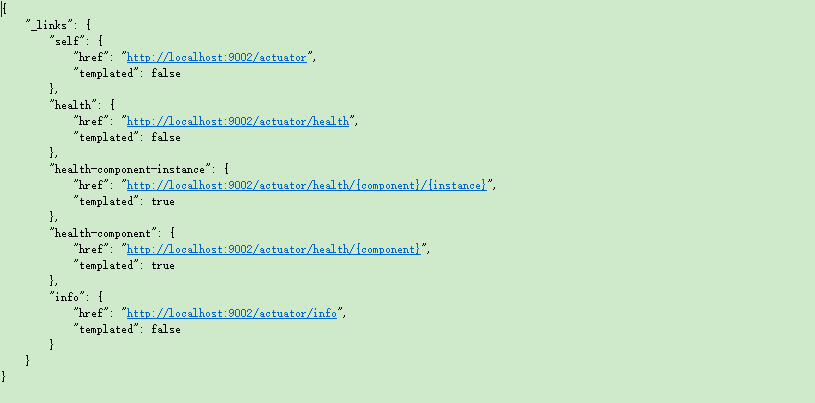
配置暴露所有Actuator监控端点,需要修改项目的application.yml文件,添加以下配置
# 配置暴露所有Actuator监控端点
management:
  endpoints:
    web:
      exposure:
        include: '*'
访问实时监控页面
启动项目,访问http://localhost:9002/actuator/hystrix.stream,可以看到实时的监控数据。
Hystrix DashBoard 监控平台
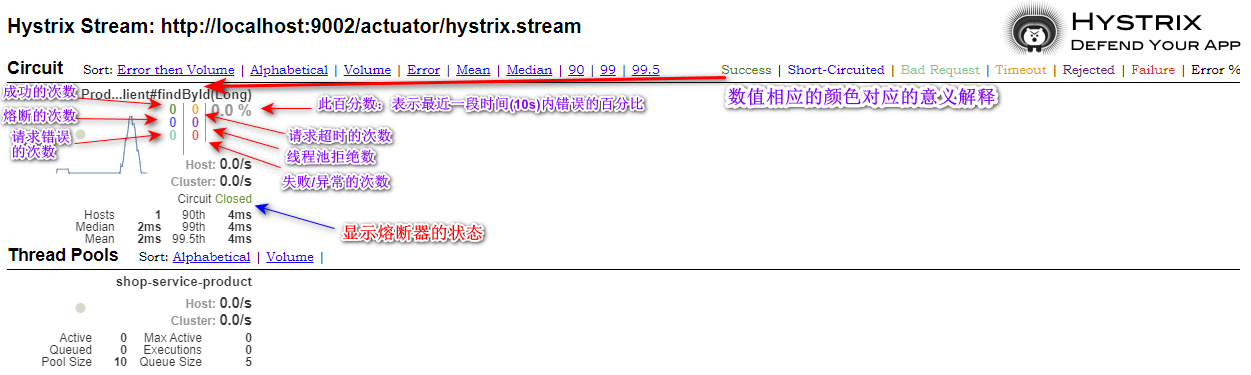
Hystrix 的实时监控,访问/hystrix.stream接口获取的都是已文字形式展示的信息。但通过文字的方式很难直观的展示系统的运行状态,所以Hystrix官方还提供了基于图形化的DashBoard(仪表板)监控平台。Hystrix仪表板可以显示每个断路器(被@HystrixCommand注解的方法)的状态。
引入依赖
搭建Hystrix DashBoard监控,配置工程的maven引入相关依赖
<!-- 引入hystrix的监控信息 -->
<dependency>
    <groupId>org.springframework.boot</groupId>
    <artifactId>spring-boot-starter-actuator</artifactId>
</dependency>
<!-- hystrix 核心依赖 -->
<dependency>
    <groupId>org.springframework.cloud</groupId>
    <artifactId>spring-cloud-starter-netflix-hystrix</artifactId>
</dependency>
<!-- Hystrix DashBoard 监控平台依赖 -->
<dependency>
    <groupId>org.springframework.cloud</groupId>
    <artifactId>spring-cloud-starter-netflix-hystrix-dashboard</artifactId>
</dependency>
开启监控平台
在项目的启动类中添加@EnableHystrixDashboard注解,表示激活监控平台(仪表盘)
@SpringBootApplication(scanBasePackages = "com.moon.order")
@EntityScan("com.moon.entity") // 指定扫描实体类的包路径
@EnableFeignClients // 开启Feign的支持
@EnableCircuitBreaker // 开启Hystrix支持
@EnableHystrixDashboard // 激活监控平台(仪表盘)
public class OrderApplication {
}
测试访问监控平台
访问相应项目的url,http://localhost:9002/hystrix,进去平台初始化页面。
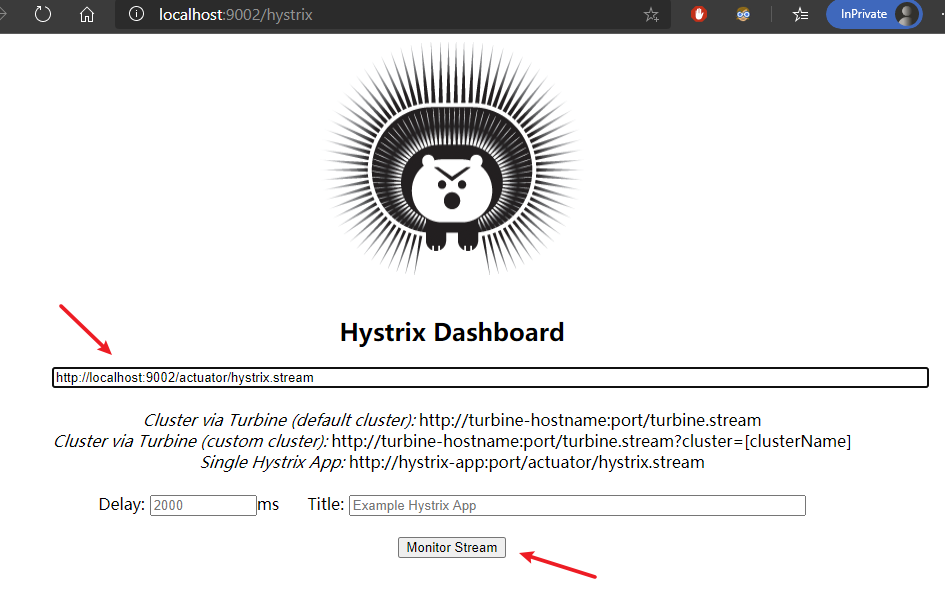
输入实时监控断点url:http://localhost:9002/actuator/hystrix.stream,以图形化方式展示监控的详细数据
断路器聚合监控 Turbine
在微服务架构体系中,每个服务都需要配置Hystrix DashBoard监控。如果每次只能查看单个实例的监控数据,就需要不断切换监控地址,这显然很不方便。要想看这个系统的 Hystrix Dashboard 数据就需要用到 Hystrix Turbine。Turbine 是一个聚合 Hystrix 监控数据的工具,他可以将所有相关微服务的 Hystrix 监控数据聚合到一起,方便使用。引入 Turbine 后,整个监控系统架构如下:
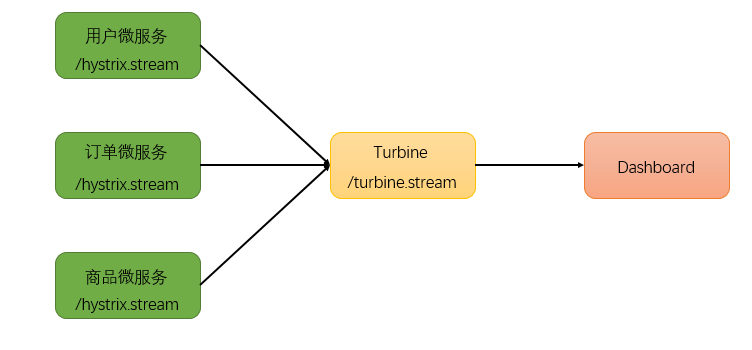
注:每个需要监控的微服务,都需要配置相应Hystrix DashBoard监控。只是访问时通过聚合监控项目可以查询所有节点的情况
搭建聚合监控工程
创建工程shop-server-hystrix-turbine,引入相关依赖坐标
<!-- Hystrix Turbine 聚合监控核心依赖 -->
<dependency>
    <groupId>org.springframework.cloud</groupId>
    <artifactId>spring-cloud-starter-netflix-turbine</artifactId>
</dependency>
<dependency>
    <groupId>org.springframework.cloud</groupId>
    <artifactId>spring-cloud-starter-netflix-hystrix</artifactId>
</dependency>
<dependency>
    <groupId>org.springframework.cloud</groupId>
    <artifactId>spring-cloud-starter-netflix-hystrix-dashboard</artifactId>
</dependency>
配置多个微服务的hystrix监控
修改项目的application.yml配置文件,开启turbine并进行相关配置
server:
  port: 8031
spring:
  application:
    name: shop-server-hystrix-turbine
# 配置eureka服务,用于获取相关监控的微服务地址列表
eureka:
  client:
    service-url:
      defaultZone: http://127.0.0.1:8001/eureka/
  instance:
    prefer-ip-address: true
# hystrix turbine 配置
turbine:
  # 配置需要监控的微服务列表,多个服务之前使用,分隔
  appConfig: shop-service-order
clusterNameExpression: "'default'"- eureka相关配置:指定注册中心地址
- turbine相关配置:指定需要监控的微服务列表
turbine会自动的从注册中心中获取需要监控的微服务,并聚合所有微服务中的 /hystrix.stream 数据
配置启动类
作为一个独立的监控项目,需要配置启动类,使用@EnableHystrixDashboard注解开启Hystrix Dashboard监控平台;并使用@EnableTurbine注解激活Turbine
@SpringBootApplication
@EnableTurbine // 开启 Turbine
@EnableHystrixDashboard // 开启Hystrix Dashboard监控平台
public class TurbineServerApplication {
    public static void main(String[] args) {
        SpringApplication.run(TurbineServerApplication.class, args);
    }
}
测试访问
浏览器访问http://localhost:8031/hystrix展示Hystrix Dashboard。并在url位置输入 http://localhost:8031/turbine.stream,动态根据turbine.stream数据展示多个微服务的监控数据
熔断器的状态
简介
熔断器有三个状态:CLOSED、OPEN、HALF_OPEN,熔断器默认是关闭状态。
当触发熔断后状态变更为 OPEN,在等待到指定的时间,Hystrix 会放开部分请求用于检测服务是否开启,这期间熔断器会变为 HALF_OPEN 半开启状态,当熔断探测服务可用时,则会将状态变更为 CLOSED,关闭熔断器
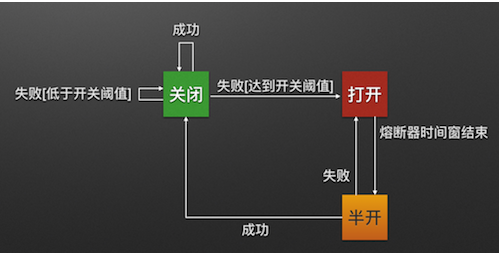
Closed:关闭状态(断路器关闭),所有请求都正常访问。代理类维护了最近调用失败的次数,如果某次调用失败,则使失败次数加1。如果最近失败次数超过了在给定时间内允许失败的阈值,则代理类切换到断开(Open)状态。此时代理开启了一个超时时钟,当该时钟超过了该时间,则切换到半断开(Half-Open)状态。该超时时间的设定是给了系统一次机会来修正导致调用失败的错误。Open:打开状态(断路器打开),所有请求都会被降级。Hystix会对请求情况计数,当一定时间内失败请求百分比达到阈值,则触发熔断,断路器会完全关闭。默认失败比例的阈值是50%,10秒内请求次数最少不低于20次。Half Open:半开状态,open 状态不是永久的,打开后会进入休眠时间(默认是5s)。随后断路器会自动进入半开状态。此时会释放1次请求通过,若这个请求是健康的,则会关闭断路器,否则继续保持打开,再次进行5秒休眠计时。
状态的测试
在spring-cloud-sample-hystrix-resttemplate示例工程中进行熔断状态的测试。
测试的准备
为了能够精确控制请求的成功或失败,在shop-service-product工程的ProductController类的findById方法中调用业务中加入一段逻辑:
@GetMapping("/{id}")
public Product findById(@PathVariable Long id) {
    // 为了能够精确控制请求的成功或失败,当id不为1时,抛出异常
    if (id != 1) {
        throw new RuntimeException("服务器异常");
    }
    // ....省略
}
当id为1时,正常请求;id不为1时,请求异常
为了更好观察测试结果,在shop-service-order引入 Hystrix DashBoard 监控平台,修改项目配置文件application.yml,修改熔断器相应的默认配置:
# hystrix 配置
hystrix:
  command:
    default:
      execution:
        isolation:
          thread:
            timeoutInMilliseconds: 3000 # 配置连接超时时长,默认的连接超时时间1秒,即若1秒没有返回数据,自动的触发降级逻辑
      circuitBreaker:
        requestVolumeThreshold: 5 # 配置触发熔断的最小请求次数,默认20
        sleepWindowInMilliseconds: 10000 # 配置熔断多少秒后去尝试请求 默认5秒   打开状态的时间
        errorThresholdPercentage: 50 # 触发熔断的失败请求最小占比,默认50%
配置说明:
requestVolumeThreshold:触发熔断的最小请求次数,默认20errorThresholdPercentage:触发熔断的失败请求最小占比,默认50%sleepWindowInMilliseconds:熔断多少秒后去尝试请求,默认5秒
测试结果分析
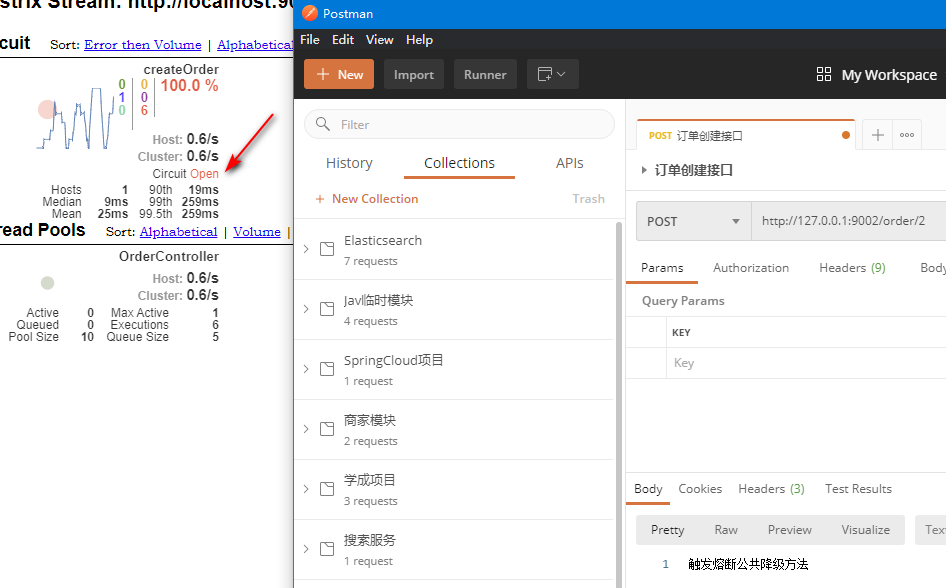
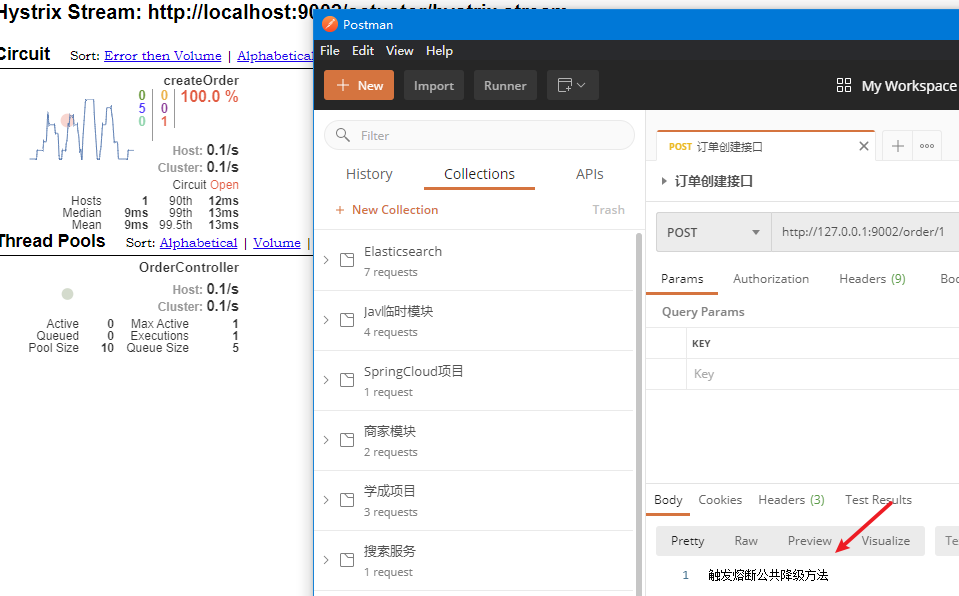
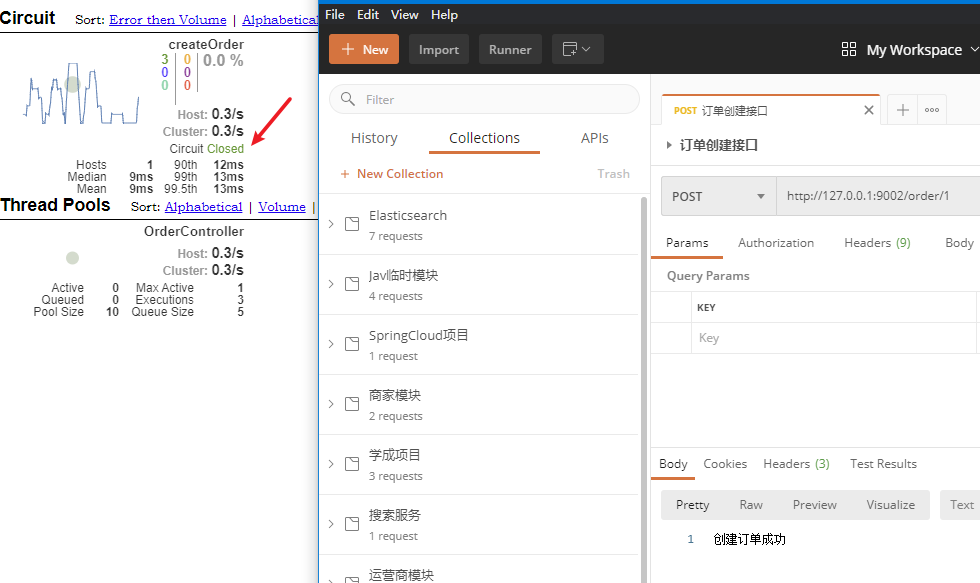
当连续访问id为2的请求时(超过10次),就会触发熔断。断路器会端口,一切请求都会被降级处理。此时访问id为1的请求,会发现返回的也是失败,而且失败时间很短,只有20毫秒左右:
熔断器的隔离策略
两种隔离策略
微服务使用 Hystrix 熔断器实现了服务的自动降级,让微服务具备自我保护的能力,提升了系统的稳定性,也较好的解决雪崩效应。其使用方式目前支持两种策略:
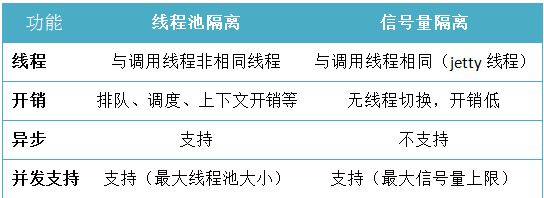
- 线程池隔离策略:使用一个线程池来存储当前的请求,线程池对请求作处理,设置任务返回处理超时时间,堆积的请求堆积入线程池队列。这种方式需要为每个依赖的服务申请线程池,有一定的资源消耗,好处是可以应对突发流量(流量洪峰来临时,处理不完可将数据存储到线程池队里慢慢处理)
- 信号量隔离策略:使用一个原子计数器(或信号量)来记录当前有多少个线程在运行,请求来先判断计数器的数值,若超过设置的最大线程个数则丢弃改类型的新请求,若不超过则执行计数操作请求来计数器+1,请求返回计数器-1。这种方式是严格的控制线程且立即返回模式,无法应对突发流量(流量洪峰来临时,处理的线程超过数量,其他的请求会直接返回,不继续去请求依赖的服务)
线程池和型号量两种策略功能支持对比
切换不同策略的配置
hystrix.command.default.execution.isolation.strategy:配置隔离策略ExecutionIsolationStrategy.SEMAPHORE:信号量隔离ExecutionIsolationStrategy.THREAD:线程池隔离
hystrix.command.default.execution.isolation.maxConcurrentRequests:最大信号量上限
hystrix:
  command:
    default:
      execution:
        isolation:
          # 配置隔离策略,取值:ExecutionIsolationStrategy.SEMAPHORE(信号量隔离)、ExecutionIsolationStrategy.THREAD(线程池隔离)
          strategy: ExecutionIsolationStrategy.SEMAPHORE # 信号量隔离
          maxConcurrentRequests: 20 # 配置最大信号量上限
Hystrix 核心源码分析
Hystrix 底层基于 RxJava,RxJava 是响应式编程开发库,因此 Hystrix 的整个实现策略简单说即:把一个 HystrixCommand 封装成一个 Observable(待观察者),针对自身要实现的核心功能,对 Observable 进行各种装饰,并在订阅各步装饰的 Observable,以便在指定事件到达时,添加自己的业务。
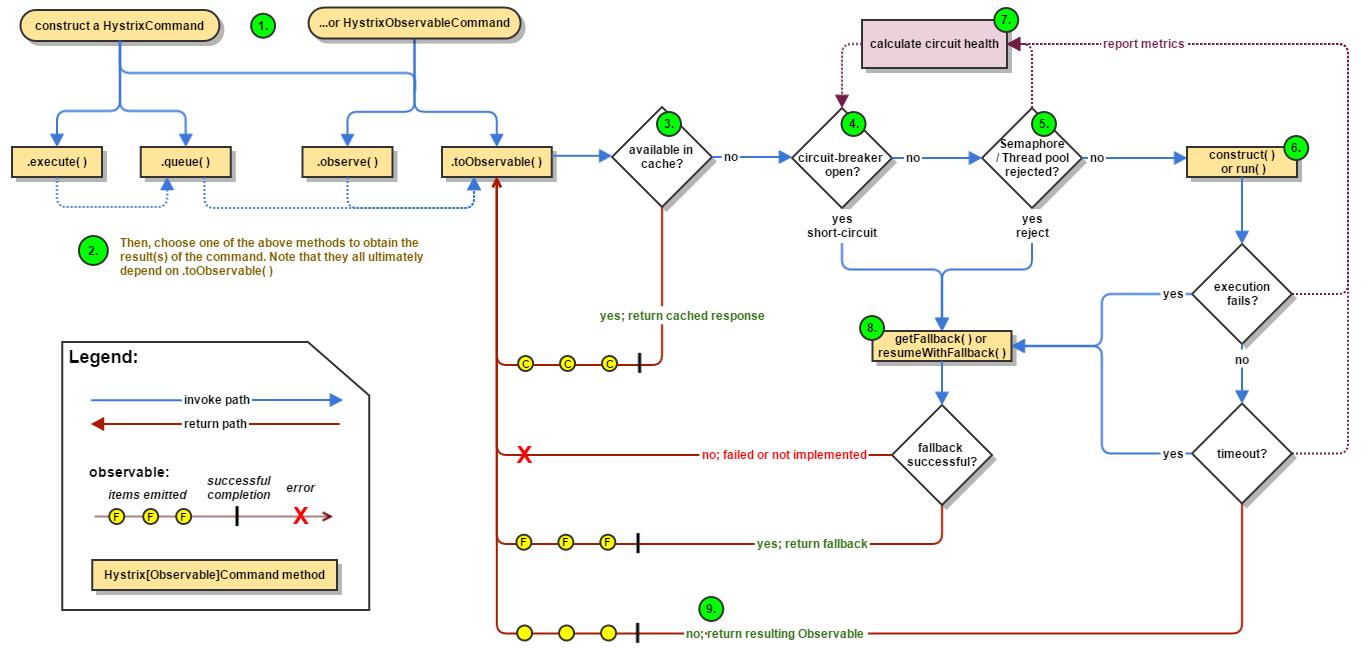
Hystrix主要有4种调用方式
toObservable():未做订阅,只是返回一个 Observableobserve():调用toObservable()方法,并向Observable注册rx.subjects.ReplaySubject发起订阅queue():调用toObservable()方法的基础上,调用:Observable.toBlocking()和BlockingObservable.toFuture()返回Future对象execute():调用queue()方法的基础上,调用Future.get()方法,同步返回run()方法的执行结果。
主要的执行逻辑
- 每次调用创建一个新的
HystrixCommand,把依赖调用封装在run()方法中 - 执行
execute()/queue()做同步或异步调用. - 判断熔断器(circuit-breaker)是否打开,如果打开跳到步骤8,进行降级策略,如果关闭进入步骤
- 判断线程池/队列/信号量是否跑满,如果跑满进入降级步骤8,否则继续后续步骤
- 调用
HystrixCommand的run方法。运行依赖逻辑,依赖逻辑调用超时,进入步骤8 - 判断逻辑是否调用成功。返回成功调用结果;调用出错,进入步骤8
- 计算熔断器状态,所有的运行状态(成功,失败,拒绝,超时)上报给熔断器,用于统计从而判断熔断器状态
getFallback()降级逻辑。以下四种情况将触发getFallback的调用:run()方法抛出非HystrixBadRequestException异常run()方法调用超时- 熔断器开启拦截调用
- 线程池/队列/信号量是否跑满
- 没有实现
getFallback的Command将直接抛出异常,fallback降级逻辑调用成功直接返回,降级逻辑调用失败抛出异常
- 返回执行成功结果
HystrixCommand 注解
通过 @HystrixCommand 注解能够更加简单快速的实现 Hystrix 的应用,查看 @HystrixCommand 注解源码,其中包含了诸多参数配置,如执行隔离策略,线程池定义等
@Target({ElementType.METHOD})
@Retention(RetentionPolicy.RUNTIME)
@Inherited
@Documented
public @interface HystrixCommand {
    String groupKey() default "";

    String commandKey() default "";

    String threadPoolKey() default "";

    String fallbackMethod() default "";

    HystrixProperty[] commandProperties() default {};

    HystrixProperty[] threadPoolProperties() default {};

    Class<? extends Throwable>[] ignoreExceptions() default {};

    ObservableExecutionMode observableExecutionMode() default ObservableExecutionMode.EAGER;

    HystrixException[] raiseHystrixExceptions() default {};

    String defaultFallback() default "";
}
其定义了 fallbackMethod 属性,其作用是提供了一个定义回退方法映射,在异常触发时此方法名对应的 method 将被触发执行,从而实现服务的降级。被 @HystrixCommand 注解的方法将会执行切面处理。其切面类是 HystrixCommandAspect.java,其切点定义如下
@Aspect
public class HystrixCommandAspect {
    private static final Map<HystrixPointcutType, MetaHolderFactory> META_HOLDER_FACTORY_MAP;

    static {
        META_HOLDER_FACTORY_MAP = ImmutableMap.<HystrixPointcutType, MetaHolderFactory>builder()
                .put(HystrixPointcutType.COMMAND, new CommandMetaHolderFactory())
                .put(HystrixPointcutType.COLLAPSER, new CollapserMetaHolderFactory())
                .build();
    }

    @Pointcut("@annotation(com.netflix.hystrix.contrib.javanica.annotation.HystrixCommand)")
    public void hystrixCommandAnnotationPointcut() {}

    @Pointcut("@annotation(com.netflix.hystrix.contrib.javanica.annotation.HystrixCollapser)")
    public void hystrixCollapserAnnotationPointcut() {}

    @Around("hystrixCommandAnnotationPointcut() || hystrixCollapserAnnotationPointcut()")
    public Object methodsAnnotatedWithHystrixCommand(final ProceedingJoinPoint joinPoint) throws Throwable {
        Method method = getMethodFromTarget(joinPoint);
        Validate.notNull(method, "failed to get method from joinPoint: %s", joinPoint);
        if (method.isAnnotationPresent(HystrixCommand.class) && method.isAnnotationPresent(HystrixCollapser.class)) {
            throw new IllegalStateException("method cannot be annotated with HystrixCommand and HystrixCollapser " +
                    "annotations at the same time");
        }
        MetaHolderFactory metaHolderFactory = META_HOLDER_FACTORY_MAP.get(HystrixPointcutType.of(method));
        MetaHolder metaHolder = metaHolderFactory.create(joinPoint);
        HystrixInvokable invokable = HystrixCommandFactory.getInstance().create(metaHolder);
        ExecutionType executionType = metaHolder.isCollapserAnnotationPresent() ?
                metaHolder.getCollapserExecutionType() : metaHolder.getExecutionType();

        Object result;
        try {
            if (!metaHolder.isObservable()) {
                result = CommandExecutor.execute(invokable, executionType, metaHolder);
            } else {
                result = executeObservable(invokable, executionType, metaHolder);
            }
        } catch (HystrixBadRequestException e) {
            throw e.getCause();
        } catch (HystrixRuntimeException e) {
            throw hystrixRuntimeExceptionToThrowable(metaHolder, e);
        }
        return result;
    }
    // ....省略
}在HystrixCommandAspect的methodsAnnotatedWithHystrixCommand方法,此方法通过环绕通知的形式对目标方法进行增强,主要作用如下:
HystrixInvokable:定义了后续真正执行HystrixCommand的GenericCommand实例- 定义
metaHolder,包含了当前被注解方法的所有相关有效信息 - 执行方法:在进入执行体前,其有一个判断条件,判断其是否是一个
Observable模式(在Hystrix中,其实现大量依赖RXJAVA,会无处不在的看到Observable,其是一种观察者模式的实现,具体可以到RxJava项目官方做更多了解)
Hystrix 服务熔断的替换方案
18年底 Netflix 官方宣布 Hystrix 已经足够稳定并且不再开发,该项目将处于维护模式。就目前来看 Hystrix 是比较稳定的,并且 Hystrix 只是停止开发新的版本,并不是完全停止维护,出现 bug 问题依然会维护的。因此短期内,Hystrix 依然是继续使用的。但从长远来看,Hystrix 总会达到它的生命周期,那么 Spring Cloud 生态中是否有替代产品呢?
替换方案介绍
Alibaba Sentinel
Sentinel 是阿里巴巴开源的一款断路器实现,目前在 Spring Cloud 的孵化器项目 Spring Cloud Alibaba 中的一员 Sentinel 本身在阿里内部已经被大规模采用,非常稳定。因此可以作为一个较好的替代品
Resilience4J
Resilicence4J 一款非常轻量、简单,并且文档非常清晰、丰富的熔断工具,这也是 Hystrix 官方推荐的替代产品。不仅如此,Resilicence4j 还原生支持 Spring Boot 1.x/2.x,而且监控也不像 Hystrix 一样弄 Dashboard/Hystrix 等一堆轮子,而是支持和 Micrometer(Pivotal 开源的监控门面,Spring Boot 2.x 中的 Actuator 就是基于 Micrometer)、prometheus(开源监控系统,来自谷歌的论文)、以及 Dropwizard metrics(Spring Boot 曾经的模仿对象)进行整合
Spring Cloud Alibaba Sentinel
Spring Cloud Alibaba Sentinel 组件详细介绍与使用,详见《Spring Cloud Alibaba Sentinel》笔记
Resilience4J(待学习与整理)
待学习与整理!